Goods from a neighbour: borrow from the next stall, sell as your own
You have run out of coffee and the customer is already at the counter. The neighbour in the next stall lends you a pack, you sell it under your own name and settle up in the evening. The app tracks that debt separately — on purpose.
What kind of deal this is
Read this once
The neighbour lends you goods, you sell them
You have run out of coffee and the customer is already at the counter. The neighbour in the next stall hands you three packs, you sell them under your own name and give them their price in the evening. The app records the whole deal — both the sale and the debt.
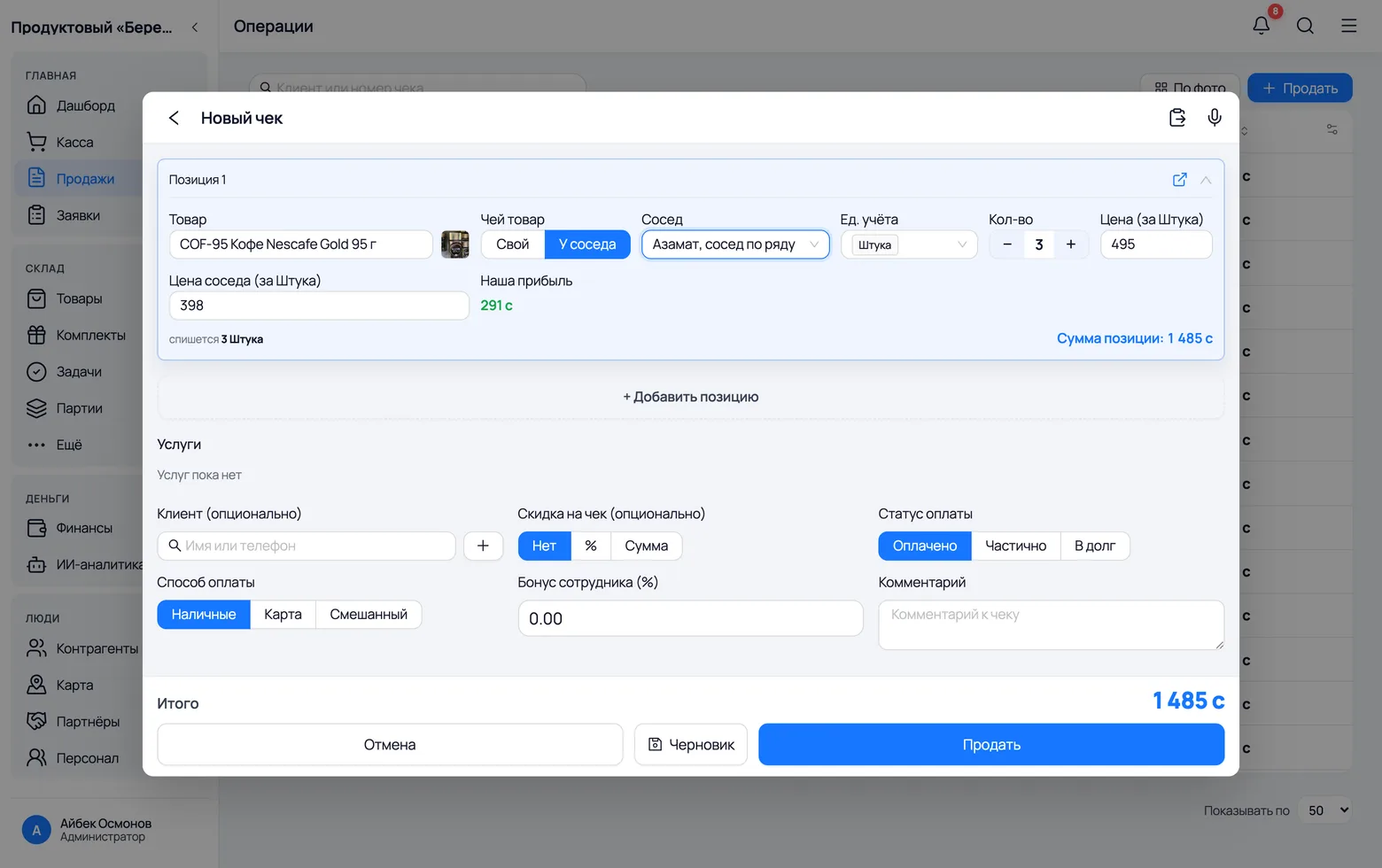
- The sale happens in your name. The customer gets your receipt and the money goes into your till. The neighbour merely lent you the goods — they have nothing to do with the customer.
- The debt to the neighbour is a goods debt: it is counted at their price, not at your selling price. The difference between the two is your profit, and the app shows it right on the line.
- Nothing is written off from your stock: the goods were not yours, and your balance does not change by a single unit.
- The debt is created only together with a receipt. The switch is on order lines too, but until the order becomes a receipt the goods have not been sold — and there is no debt.
Why borrowed goods have no arrival receipt
The most common question: “why can't I book this as an arrival from the neighbour and then sell it?” You could — but your books would start lying in three places at once.
- Someone else's goods would land on your stock. An arrival means “the goods came to our shelf”. The neighbour's three packs were never on your shelf, so at stock-take there is nothing to count — your figures would stop matching what you can touch.
- The wrong batch would be written off. The app writes goods off in order — the earliest arrival first, at its own purchase price. An arrival from the neighbour would join the end of the queue, and the sale would consume your own older pack. A “neighbour's stock” that does not exist would hang there forever, and the profit on the receipt would be calculated at someone else's price.
- There is physically nowhere to receive it. An arrival always has a location — a warehouse or a sales floor. The neighbour's goods have none and cannot have one: they sit in their container, not yours.
- That is why the neighbour debt lives apart from arrivals and never mixes with an ordinary supplier debt on an invoice. The same person can be both: some goods you bought from them on an invoice, others you simply grabbed from the next stall for an hour.
Turn it on and sell
Three steps, in order
Turn on “Goods from neighbours”
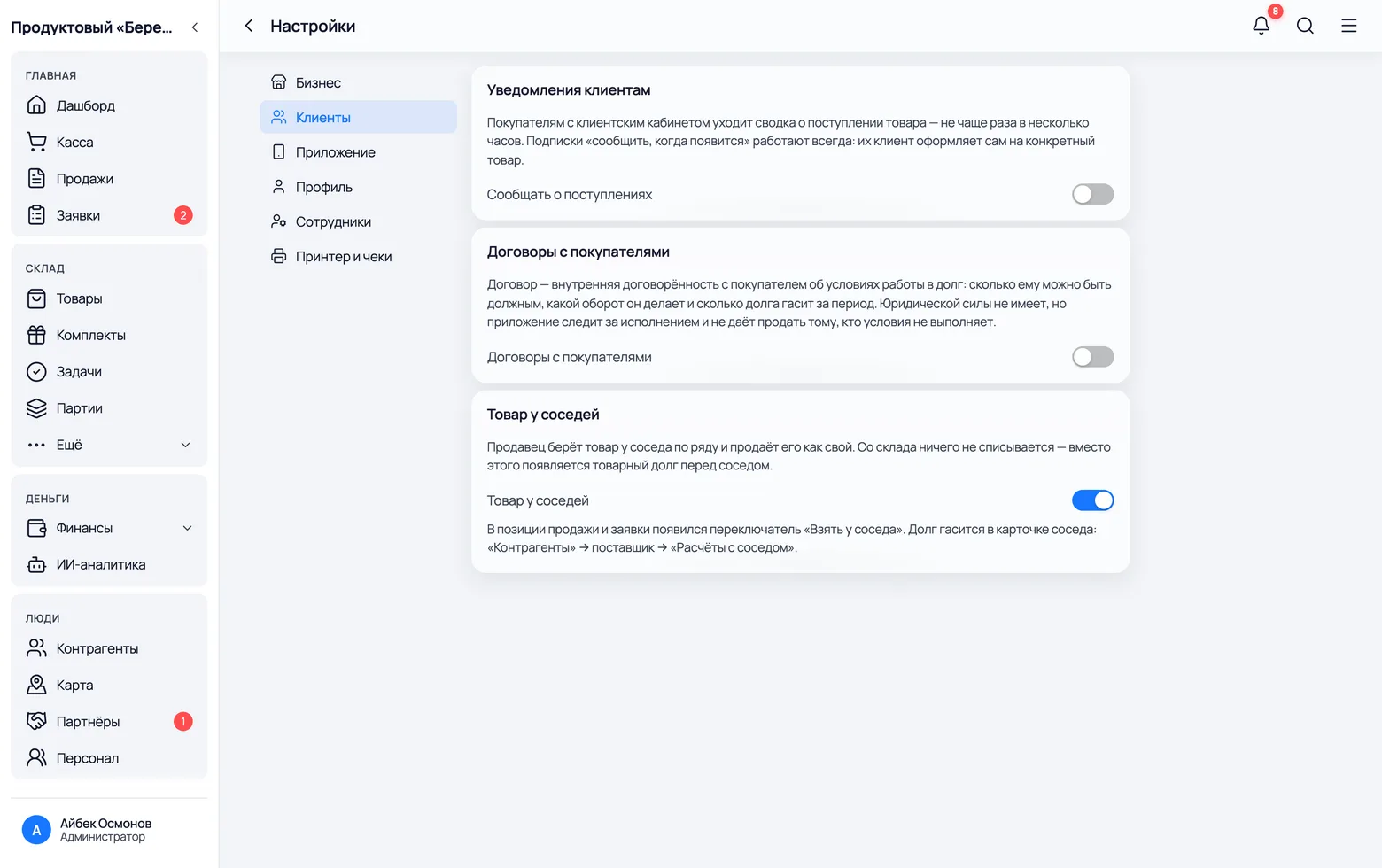
The feature is off by default: an ordinary shop does not need it, and when it is on every receipt line gains one more switch. The owner turns it on once.
 1
2
1
2
- 1Open Settings and pick the Customers section on the left. On a phone: More → Settings → Customers.
- 2Switch on Goods from neighbours. The note under the toggle tells you at once where the switch appears on a receipt and where the debt is settled later.
- Only the company owner sees the toggle. Your salesperson will get the switch on receipts the next time they sign in.
- Turning it off deletes nothing: existing debts stay on the neighbours' cards and can be settled as before. The switch only stops new ones.
Sell the neighbour's goods
The sale works as usual — same button, same receipt, same customer. Only one thing changes: on the line you say that the goods are not yours.
1
2
3
4
5
6
- 1Press Sell and pick the product — the very one you have run out of. The list is the shared catalogue: to borrow an item from a neighbour it must exist in your catalogue. No card yet? Create it, it takes a minute.
- 2Whose goods → From neighbor. The location field disappears: there is nothing to write off, the goods are not yours.
- 3Pick the neighbour you borrowed from. No card yet? Type the name in the same list and press New neighbor: they are created as a supplier card right from the receipt, so the customer does not have to wait.
- 4Neighbour's price — what you will pay them per unit. The purchase price from the product card is filled in, but the neighbour may have given it at another price — correct it, because this number becomes your debt.
- 5Our profit is calculated for you: selling price minus the neighbour's price, times the quantity. In the screenshot 495 − 398 = 97 c per unit, three units — 291 c.
- 6The rest is as usual — customer, discount, payment status and method — then Sell. You can mix within one receipt: some lines your own, others from different neighbours.
- The debt to the neighbour appears exactly when the receipt is rung up. If you saved a draft or created an order, the goods are not sold yet — and there is no debt.
- The stock figure for that product will not move after the sale, and that is not a bug: what you sold was not yours.
- Only ordinary products can be borrowed. A kit will not work: on sale it is broken into its components and they are written off from your location, which borrowed goods do not have.
What changed after the sale
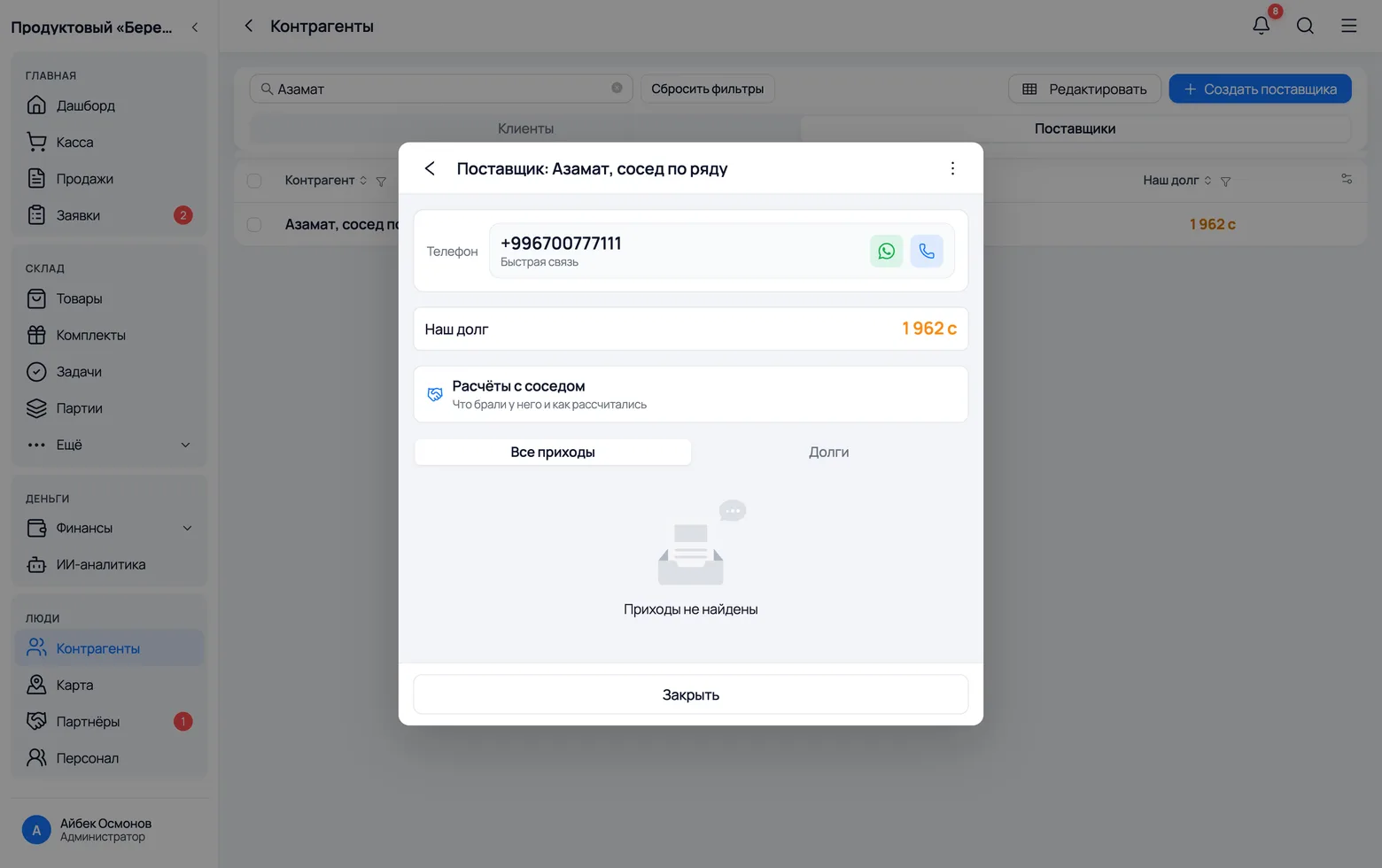
The receipt is done. Open Counterparties → Suppliers and find the neighbour: their card now holds everything the app remembered about the deal — and nothing that should not be there.
 1
2
3
1
2
3
- 1Our debt has grown by the neighbour's price — 1,962 c here for everything taken from them and not yet returned. Your selling price is not part of it: you owe the neighbour their price, not yours.
- 2The arrivals tab, meanwhile, is empty. There is no arrival receipt behind this deal — exactly for the reasons in the chapter above. A debt without an arrival is the correct picture here.
- 3Settlements with neighbour — this is where you come back in the evening to pay up. Everything about this neighbour sits behind one button.
- On the receipt itself the line is labelled “From neighbour: name” — a month later you can still see who supplied it, without any notes on paper.
- In the stock history that row is marked “Taken from the neighbour”: it did not move any stock, and without the mark it would read like an ordinary write-off.
- The neighbour debt also shows in the general counterparty list, in the “Our debt” column, next to ordinary supplier debts on invoices.
Settling up
In the evening or at the end of the week
Clearing the debt: pay or write off
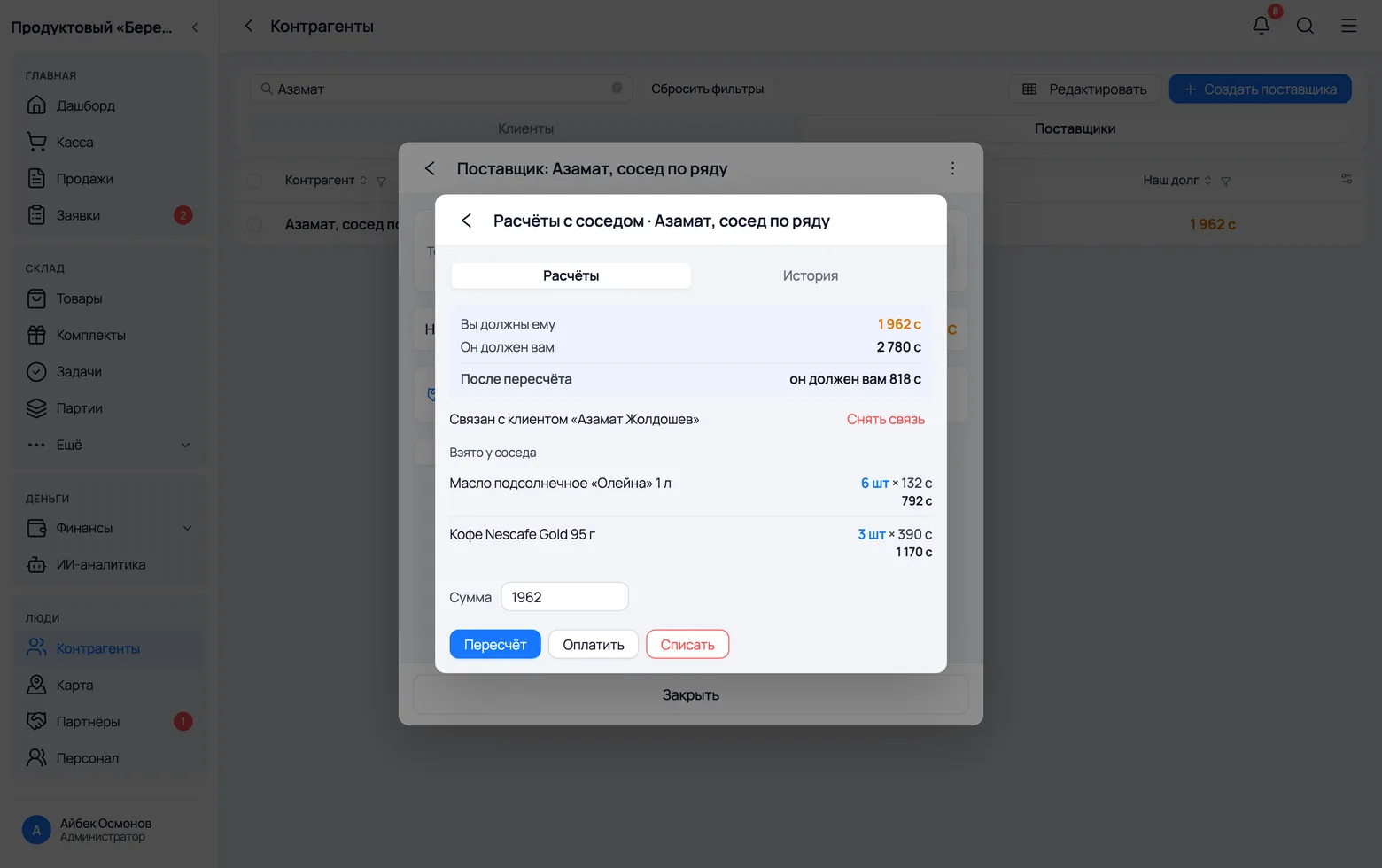
In the evening you settle up. Everything you need is on one card: how much you owe, for what exactly, and how to close it.
 1
2
3
4
1
2
3
4
- 1The top line is You owe them: the total at the neighbour's price for everything taken and not yet returned. Below is the list — what exactly, how many units and at what price. Without the list, “you owe 1,962 c” says nothing.
- 2Amount — how much you are closing right now. It defaults to the whole debt, but people often settle with a neighbour in parts, so you can lower it.
- 3Pay — you handed over the money. The amount leaves the company balance and goes into payments to that supplier, like any payment for goods.
- 4Write off — close the debt with no money moving: you settled outside the app, swapped goods, or the neighbour let it go. The till is untouched, because nobody paid anything.
- The list shows the remainder on each line: if you settled in parts, the quantity and the sum go down while the line stays.
- Fully settled lines leave this list — it is about what still needs paying. They are not lost: they are on the “History” tab.
- The “Settlements with neighbour” row appears only for people allowed to see counterparty debts. A salesperson without that permission does not see it — nor debt amounts at all.
Offset: when the neighbour owes you too
At a bazaar people borrow from each other in turn: today from them, tomorrow from you. The Offset button closes the two debts against each other — with no money, no till and no receipts.
1
2
3
4
- 1First link the two cards of the same person. A neighbour has two: as a supplier they lent you goods, as a customer they took goods from you. The app suggests a match by name and phone, and you confirm it with Link. The finished pair shows as “Linked with customer …” and can be undone at any time.
- 2They owe you — the counter-debt: this is what the neighbour has not paid you on their own receipts.
- 3After offsetting — what will be left. The smaller of the two sums is used: 1,962 against 2,780 cancels 1,962, and the neighbour is still left owing you 818 c.
- 4Press Offset. Both sides go down by the offset amount, and a record stays on both cards — so later you can see where the difference came from.
- A person links the cards, not the app. Supplier and customer are two different counterparties, and only the seller knows that both are the same Azamat from the next row. The app can merely suggest a match by name and phone; had it guessed wrong, someone else's debt would have been cancelled.
- An offset moves no money. The company balance, the day's till and the shift report all stay as they were — and that is the whole point. Nobody handed anybody any cash. Had the offset been booked as a receipt payment, the evening count would show income that never arrived, and the till would stop matching the drawer.
- That is why the logs keep an entry with a zero amount: the event happened, the money did not. The customer's debt goes down exactly as it would from a manual debt correction.
- If the linked customer owes nothing, the Offset button is disabled: there is nothing to cancel out.
History: everything you ever took
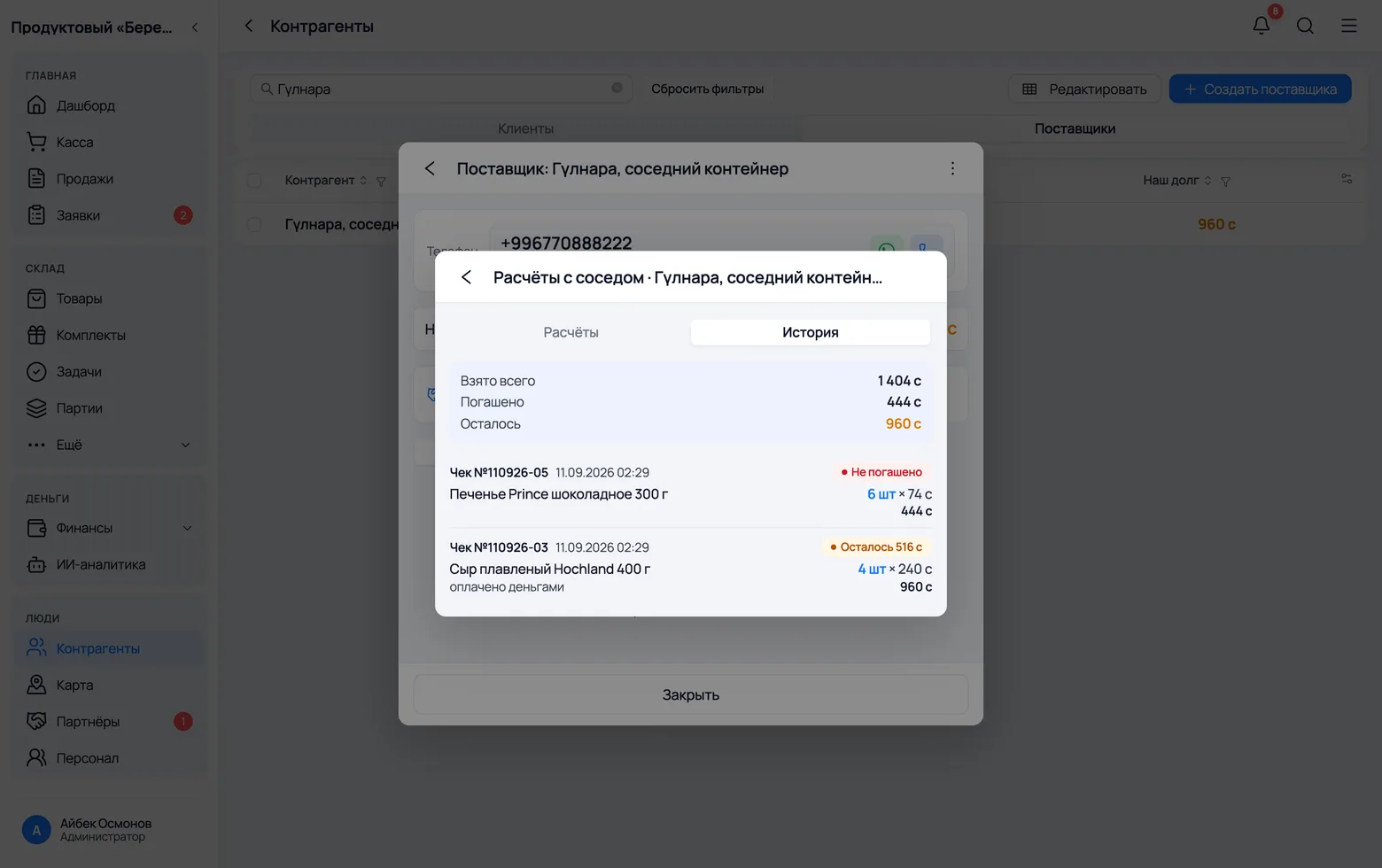
The “Settlements” tab answers “how much do I owe right now” and shows only what is open. The History tab answers a different question — “what have I taken from them over time” — and nothing ever leaves it.
 1
2
3
4
5
1
2
3
4
5
- 1Switch to History on the same settlement card.
- 2Taken in total — the value of everything you have ever taken from this neighbour, at their prices.
- 3Settled — how much of that is already closed: by money, by an offset or by a write-off.
- 4Outstanding — the same figure as on the “Settlements” tab. The three lines always add up: taken = settled + outstanding.
- 5Every row carries the receipt number, the date and its state: “Unsettled”, “… left” or “Settled”. Under the row you see how it was closed: paid in cash, offset or written off. The receipt number always leads you back to the sale itself.
- The two lists are deliberately separate: a neighbour has a handful of open debts but hundreds of lines taken over a year. Merge them and what you must pay today would drown in what was settled long ago.
- The history grows with every sale of borrowed goods and loads in chunks — the “Show more” button at the bottom of the list.
What the app will not let you do
A few restrictions you may bump into. None of them is there out of spite: behind each is a broken set of books that nobody could untangle later.
- You cannot sell a neighbour their own goods. If the same person is the buyer on the receipt, the app will not let you borrow from them. Otherwise you would take a pack from them on credit and immediately invoice them for it — a counter-debt out of thin air that the very first offset would cancel to zero along with both sides' real debts. The block only works on a linked pair of cards: without a link the supplier and the customer are two different people, and only the seller knows they are one. Your own goods sell to a linked neighbour as usual.
- There is no switch on arrivals. “Take from neighbour” exists only on sales and orders: an arrival is goods that came to your shelf, and borrowed goods never did.
- You cannot return such a line through a receipt refund. The goods have already gone to the customer while the debt to the neighbour remains. Agree with the neighbour separately and close the debt with “Pay” or “Write off”.
- Took the goods but did not sell them? Just give them back. With no receipt there is nothing to record in the app: the debt is born only together with a sale.
- Turning the feature off deletes nothing. Open debts stay visible and can be settled, and a receipt that already has a borrowed line is still editable. The switch stops the new, not the old.